


Trip.com: Book Flights, Hotels
4.73.40K Reviews
App Specs
- Version
- 8.58.0
- Updated On
- License
- Free
- Downloads
- 50,000,000+
- Developer
- Trip.com
- Categories
- Travel & Local
- Platform
- Android, iOS
Screenshots





 Analysis by AppCompare
For me, travel apps are most useful when they make decisions easier without making me feel locked into one booking. Trip.com: Book Flights, Hotels brings several parts of planning into one place, so I can compare a flight, look for a stay and keep the trip’s details together. That convenience matters most when I’m planning on a phone between other tasks, but it also means the experience depends on a working connection at key moments. I’d treat it as a helpful travel-planning option, not a replacement for checking the final details before I pay or leave home.
Where a connection matters most
Searching and comparing are the moments when connectivity has the biggest effect. Flight choices, hotel availability and displayed prices can change, so I wouldn’t rely on an old search as a final answer. I’d use the app while I have a steady connection to compare options, check the conditions attached to a booking and complete the transaction. If a page is slow or a result does not load, waiting for the connection to settle is safer than assuming the first screen tells the whole story.
That matters especially when plans are time-sensitive. Say I’m on a lunch break and trying to find a flight for a weekend away: I can narrow down options in the app, but I’d avoid rushing through the last steps just because I’m short on time. I would review the route, dates, baggage information and any layover details shown before confirming. A convenient search is only useful if I’m confident I’m booking the trip I intended.
Useful on the move, with a little preparation
The app makes most sense for travelers who do a lot of planning from a phone: people comparing options during a commute, arranging a hotel after a schedule changes, or keeping several parts of a trip in view. Having flights and accommodation in the same travel app can reduce the effort of switching between separate search tools. For a multi-stop trip, I’d still keep a simple note of the key dates and confirmation details somewhere I can find them quickly, rather than expecting one app to be my only reference.
It is less compelling if you already have a narrow routine, such as booking directly with one airline or hotel chain to manage all your travel in that provider’s own system. A dedicated provider app may suit you better if you value its specific loyalty tools or want to handle changes directly with that company. Trip.com is more appealing when comparison and a broader booking workflow matter more than staying inside one provider’s ecosystem.
Recovering when a step goes wrong
Travel planning can be interrupted by a weak signal, a timed-out page or a payment step that takes longer than expected. If that happens, I would first check whether the booking is actually confirmed before trying again; repeating a payment or reservation without checking can create unnecessary uncertainty. I’d also keep confirmation messages and essential trip details easy to locate, so I have another reference if the app takes time to refresh. This is a sensible habit with any booking service, not a reason to avoid using this one.
For a change of plan, I’d read the conditions on the specific flight or accommodation before booking rather than assuming every option has the same flexibility. A low displayed fare may be less suitable if it comes with terms that do not fit the trip. The useful comparison is not just the headline price: it is whether the schedule, baggage arrangement and booking conditions work for me. Taking a moment to inspect those details can save stress later.
Worth Reading Before You Choose

Flipboard Shows What News Apps Must Do Beyond the Feed

Switching to Android Auto Means Rethinking Your Driving Routine

Google Calendar Makes a Crowded Week Easier to Manage

Ludo King Makes the Most of the Minutes Between Plans

Baby Panda World Brings Quick Play to Modern Phones, but Its Game Library Feels Busy

ESPN’s Live Game View Makes Following Close Games Easier
Using mobile data thoughtfully
When I’m traveling, I try to save mobile data for tasks that genuinely need it. I’d do the heavier browsing and booking while connected to reliable Wi-Fi, then keep important confirmations accessible in a way I can readily retrieve. I would not assume that every screen or travel detail will be available without a connection; access can depend on what has loaded and what the app currently needs to retrieve. Before leaving Wi-Fi, I’d check that I can find the information I expect to need.
There is also a practical trade-off in doing everything on a small screen. A phone is convenient for a quick search, but comparing several flight conditions or hotel choices can be harder than reviewing them on a larger display. When the itinerary is complicated, I’d use the phone for discovery and keep a separate written outline of the important decisions. For a simple overnight stay or a straightforward return flight, the mobile workflow is much easier to manage end to end.
Who gets the most from it
I’d recommend considering this app if you like comparing travel options in one place and often organize trips while away from a desk. It is particularly useful when a trip combines transport and accommodation and you want to begin the search from one mobile interface. A traveler who prefers to research several possibilities before committing can use it as a starting point, then verify the terms of the chosen booking before confirming.
On the other hand, someone who rarely travels, already knows exactly which provider they want, or prefers to arrange every detail by speaking with a travel agent may not gain much from another booking app. It also may not suit anyone who expects uninterrupted access in places with unreliable service. I see its strongest role as helping me compare and organize, while leaving room for direct provider contact or another option when a booking has special requirements.
First Impressions and User Interface
Right off the bat, the Trip.com app greeted me with a sleek and intuitive interface. It’s super user-friendly, which means even if you’re not tech-savvy, you won’t be scratching your head trying to figure things out. The design is clean, with everything neatly organized into categories like Flights, Hotels, and Car Rentals. I particularly appreciated how everything is just a tap away, making it easy to navigate through the app.
One thing that stood out to me was the app’s speed. There’s nothing worse than waiting for ages for an app to load, especially when you’re in a hurry to book that last-minute flight. Thankfully, Trip.com runs smoothly without any annoying lags.
Booking Flights Made Easy
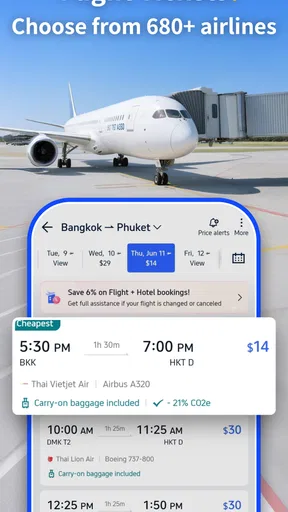
Now, let’s talk about booking flights. This is where the app truly shines. Whether you’re planning a quick weekend getaway or a month-long vacation across the world, Trip.com has got you covered. You can search for flights based on your preferences, compare prices, and even set up alerts for price drops. How cool is that?
I tested this feature by searching for a flight from New York to Tokyo. The app quickly presented a variety of options from different airlines, complete with detailed information on layovers, seat availability, and baggage policies. I loved how it displayed the cheapest options at the top, saving me both time and money.
Hotels and Accommodations
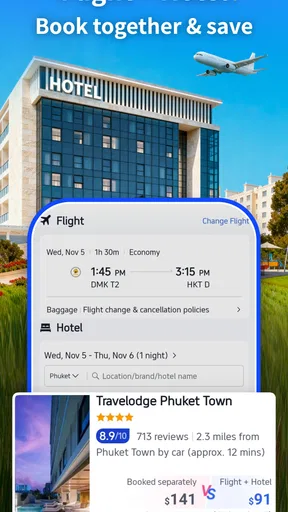
Booking a hotel can sometimes be a nightmare, especially if you’re trying to find the best deals. But with Trip.com, it’s a breeze. The app lets you filter hotels by price, star rating, and even guest reviews. It’s like having a personal travel agent in your pocket.
I booked a three-night stay at a hotel in Paris, and the process was seamless. The app provided detailed descriptions, high-quality photos, and even nearby attractions. I also scored a great deal thanks to the app’s special promotions and discounts. Talk about a win-win!
Additional Features Worth Mentioning
Besides flights and hotels, Trip.com also offers car rentals, train tickets, and even attraction bookings. It’s truly a one-stop-shop for all your travel needs. The app also supports multiple languages and currencies, which is a huge plus if you’re traveling internationally.
Another feature I found handy was the app’s offline access to itineraries. Once you’ve booked your trip, you can access all the details without needing an internet connection. This is perfect for those moments when you’re on the go and can’t find Wi-Fi.
My Final Thoughts
After exploring all that Trip.com: Book Flights, Hotels has to offer, I’m genuinely impressed. It’s efficient, user-friendly, and packed with features that make travel planning less of a chore and more of an exciting part of the journey. Whether you’re a frequent flyer or an occasional traveler, this app is definitely worth having on your phone.
So, if you’re looking to simplify your travel adventures and snag some great deals along the way, give Trip.com a try. You won’t be disappointed! Safe travels and happy exploring!
As a travel and local app from Trip.com, it sits between broad comparison services and single-provider booking apps. Its appeal is the chance to look across travel choices without beginning a separate search for every part of a trip. That does not mean every option will be the best fit: I would compare a promising result with the relevant airline or accommodation provider when details such as flexibility, baggage or a special request are decisive.
Small checks that make planning smoother
A useful habit is to search with the trip’s constraints in mind before sorting by price. For flights, that means deciding whether a long connection or a less convenient departure is acceptable; for a hotel, it means checking the location against the places I actually plan to visit. A cheap result can become a poor choice if it adds difficult transfers or leaves me far from the reason for the trip. I use filters to reduce the field, then inspect a few realistic candidates rather than treating the first result as a recommendation.
For a group trip, I’d settle the basics with everyone before opening the booking flow: exact dates, acceptable departure times, room needs and a spending limit. This avoids repeatedly searching because one person has a different assumption. If plans are still uncertain, I’d compare the booking conditions before choosing, instead of assuming that a lower price is worth the reduced flexibility. Those checks are more valuable than simply moving quickly through the screens.
What the audience figures mean in practice
The app is free to download, is rated for Everyone, and has an average rating of 4.7 from around 854,000 ratings. More than 50 million installs suggest it is a familiar choice for many travelers, but popularity alone cannot tell me whether a particular fare or hotel suits my needs. I treat ratings as a broad signal that the app is widely used, not as a guarantee that every booking will be straightforward or every deal will beat alternatives.
Trip.com has been available since July 31, 2013, and version 8.50.0 supports devices running Android 7.0 or later. That gives Android users a clear starting point for checking compatibility before installing. The key practical question remains whether the app’s way of organizing searches fits how you travel: frequent comparers may value its breadth, while someone who books through a familiar provider may prefer that provider’s direct tools.
When I would choose another route
If a booking involves unusual accessibility needs, a complicated multi-city itinerary or a time-sensitive change, I would not rely on a quick mobile comparison alone. I’d verify the details with the provider responsible for the service and keep the relevant confirmation close at hand. That is not specific to one app; it is a sensible boundary for any intermediary when the trip has requirements that a standard search may not capture clearly.
Connectivity is another deciding factor. I would do essential searches and booking steps where the network is dependable, then prepare the information I need for the journey. If I expect to spend a long stretch without service, I would not make an assumption about which app screens will remain available; I’d confirm access to the particular itinerary details beforehand and keep a separate record of the essentials. This makes the app more useful without depending on it to solve every travel-day problem.
My connectivity verdict
Trip.com is best for me as a connected planning companion: a place to compare flights and stays, explore other travel arrangements and bring the early stages of a trip together on a phone. It is less persuasive as the only source I would depend on when service is uncertain or the booking needs special handling. I’d use it for the convenience, take time over the terms and preserve the details I may need later. If that balance suits the way you travel, it is a practical app to keep in mind; if you want a single provider’s direct support or a fully offline-first travel tool, another approach may serve you better.
Pros
- User-friendly interface for easy navigation.
- Comprehensive search filters for tailored results.
- Exclusive deals and discounts on bookings.
- 24/7 customer support for hassle-free assistance.
- Supports multiple currencies for global users.
Cons
- Occasional delays in booking confirmations.
- Limited options for certain destinations.
- App notifications can be overwhelming.
- Some features require stable internet connection.
- Currency conversion rates may vary slightly.
FAQs for Trip.com: Book Flights, Hotels
What features does the Trip.com app offer to enhance my travel experience?
Trip.com provides a comprehensive travel solution, offering features like flight booking, hotel reservations, and car rentals. The app also delivers real-time flight updates, itinerary management, and exclusive travel deals. Users can access a 24/7 customer service chat, ensuring smooth and hassle-free travel experiences. Additionally, the app supports multiple currencies and languages.
Is Trip.com reliable for booking international flights and accommodations?
Yes, Trip.com is highly reliable for booking international flights and accommodations. It partners with major airlines and hotels worldwide, providing a vast selection of travel options. The app is known for its competitive pricing and user-friendly interface, making it easy to compare and secure the best deals available. Customer reviews and ratings further validate its reliability.
How can I manage my travel itinerary using the Trip.com app?
Managing your travel itinerary on Trip.com is simple and efficient. Once bookings are confirmed, the app automatically organizes your flight details, hotel reservations, and car rentals into a cohesive itinerary. You can view and edit your itinerary directly within the app, receiving real-time updates and notifications about any changes, ensuring a seamless travel experience.
Are there any additional fees or hidden costs when booking through Trip.com?
Trip.com is transparent about its pricing, and there are no hidden fees. The app clearly displays all costs, including taxes and service fees, during the booking process. Users are encouraged to review the total cost before confirming any bookings. Occasionally, there may be opportunities to purchase add-ons, but these are optional and clearly marked.
What customer support options are available on the Trip.com app?
Trip.com offers robust customer support options directly within the app. Users can access 24/7 live chat support, ensuring assistance is always available. Additionally, there are help articles and FAQs for common queries. For more complex issues, users can contact support via email or phone, ensuring comprehensive support throughout their travel experience.


